> strategy installation guide
Matrix Trader Trial: set up in NinjaTrader 8
The free 14-day trial runs on Sim accounts only. Your 14 days start the first time Matrix Trader Trial runs, not when you sign up.
↓ Download this guide as PDF1. Install
- Download MatrixTrader_Trial.zip from the link in your trial email.
- In NinjaTrader 8: Tools > Import > NinjaScript Add-On, pick the zip.
- Restart NinjaTrader.
2. One Sim account per strategy
NinjaTrader keeps one position per market per account, so two strategies in the same account can cancel each other's trades. Give each strategy its own Sim account (up to 3).
- Control Center > Accounts tab, right-click, Add simulation account.
- Name them, for example
SimFlow,SimPivot,SimHunter.
Each strategy you add trades one market. To run a strategy on several markets, add it once per market. Different markets can share the same Sim account; the same market twice in one account is not allowed.
| SIM ACCOUNT | ADD THESE (ONE ROW OR CHART EACH) |
|---|---|
| SimFlow | Matrix Flow on MES, Matrix Flow on MNQ, Matrix Flow on MGC |
| SimPivot | Matrix Pivot on MNQ, Matrix Pivot on MGC |
| SimHunter | Matrix Hunter on MNQ, Matrix Hunter on MES |
Run as many of these as you like. The trial allows up to 3 Sim accounts, and the daily goal and loss limit count all of them together.
3. Start a strategy
Two ways. Option A (no chart needed) is the simplest; Option B runs it on a chart so you see the trades and status box.
Option A: Strategies tab, no chart
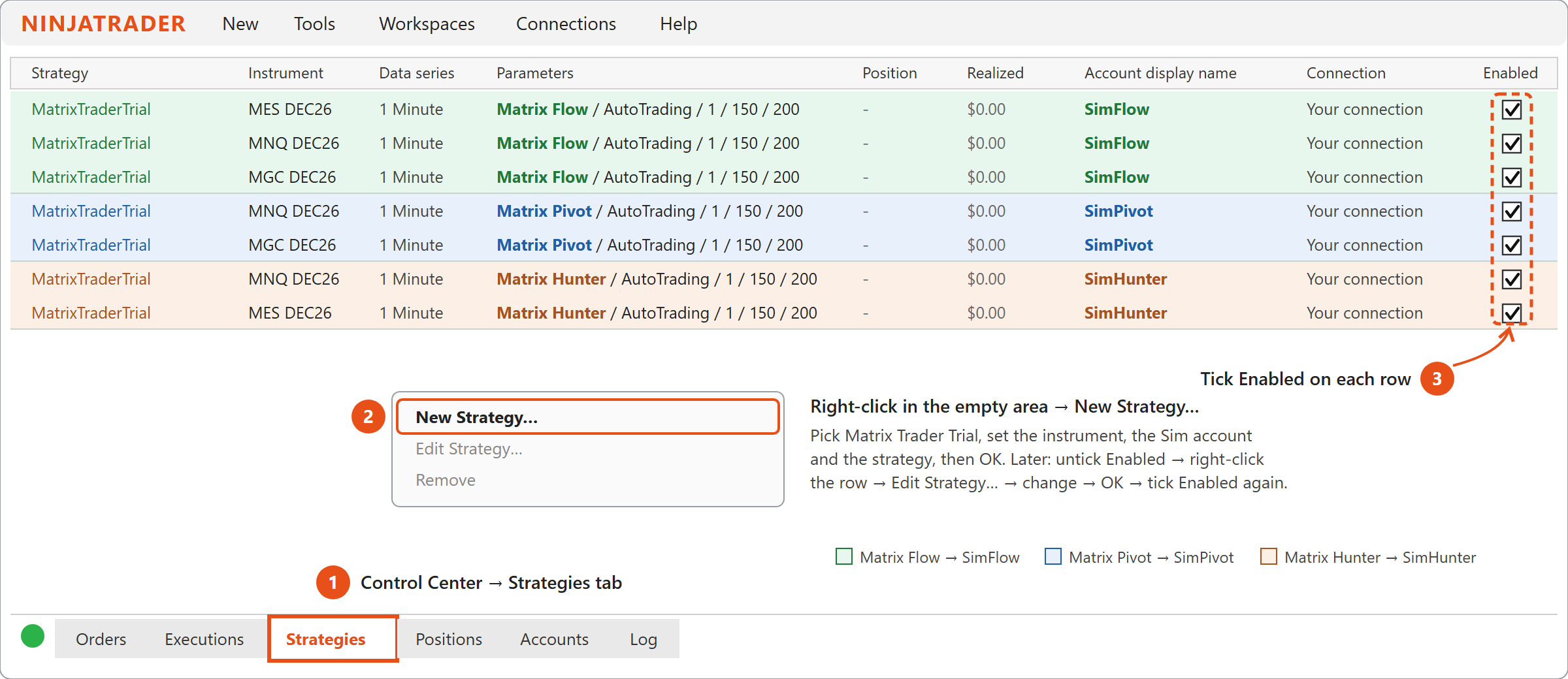
- Control Center > Strategies tab, right-click, New Strategy…
- Pick Matrix Trader Trial and set:
- Instrument: the current contract of the market, e.g.
MNQ 12-26. - Data series: any, e.g. 1 Minute.
- Account: that strategy's Sim account (e.g. SimFlow).
- The Matrix settings below (trial key, disclaimer, strategy and the rest).
- Instrument: the current contract of the market, e.g.
- Click OK, then tick Enabled on the new row.
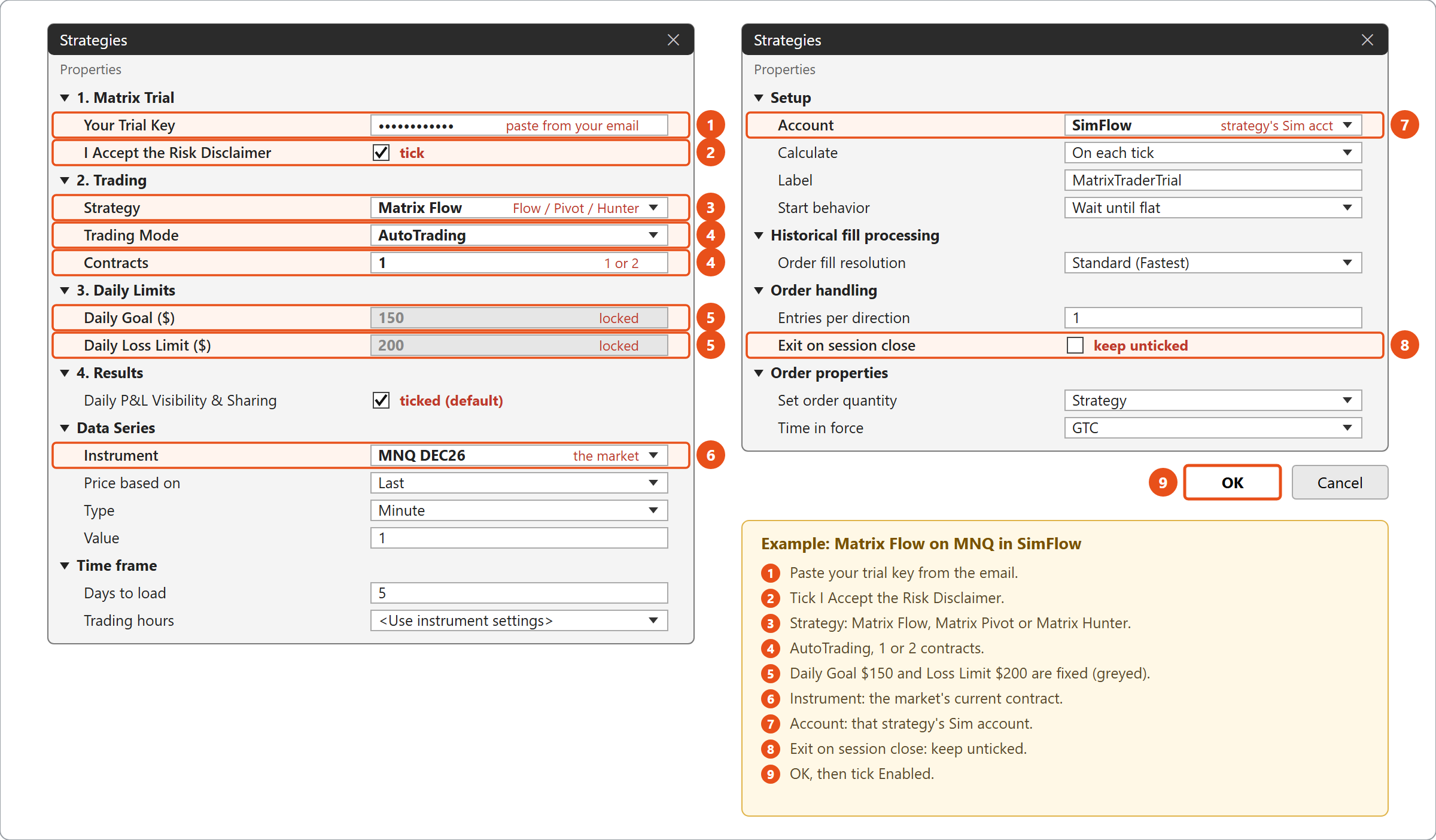
- To change settings later: untick Enabled, right-click the row, Edit Strategy, make your changes, click OK, and tick Enabled again. No chart needed.
- Without a chart you don't get the status box and trade markers. Trades show in the Strategies, Positions and Orders tabs, and messages in New > NinjaScript Output.
Option B: on a chart
- Open a chart of the market (any timeframe) and select the strategy's Sim account in Chart Trader.
- Right-click the chart: Strategies > Matrix Trader Trial > Add.
- Settings:
- Your Trial Key: paste the key from your email.
- I Accept the Risk Disclaimer: tick it.
- Strategy: Matrix Flow, Matrix Pivot or Matrix Hunter.
- Trading Mode: AutoTrading, or SignalsOnly (signals are drawn, no orders).
- Contracts: 1 or 2.
- Daily Goal ($150) and Daily Loss Limit ($200) are fixed during the trial (greyed out), the same for every trial user.
- Set Enabled and click OK. The chart shows
Matrix Trader Trial (14 days left) - Matrix Flow : ACTIVE.
4. Daily goal and loss limit
- They are fixed at $150 and $200 for every trial user, and count all your Sim accounts together: one $150 goal for the day, not one per strategy.
- At the goal, no new trades are taken. A trade that is still open keeps running, but is closed if the day falls back to the goal, so you keep at least your goal.
- At the loss limit, open trades are closed and trading stops for the day.
- Trading starts again by itself at the new trading day (6 PM ET).
- Flat before the daily break: at 4:40 PM ET Matrix closes any open trade and takes no new one until 6 PM ET (Friday: until Sunday 6 PM). The strategy stays on and trades again from 6 PM by itself.
5. Dashboard and your trial results
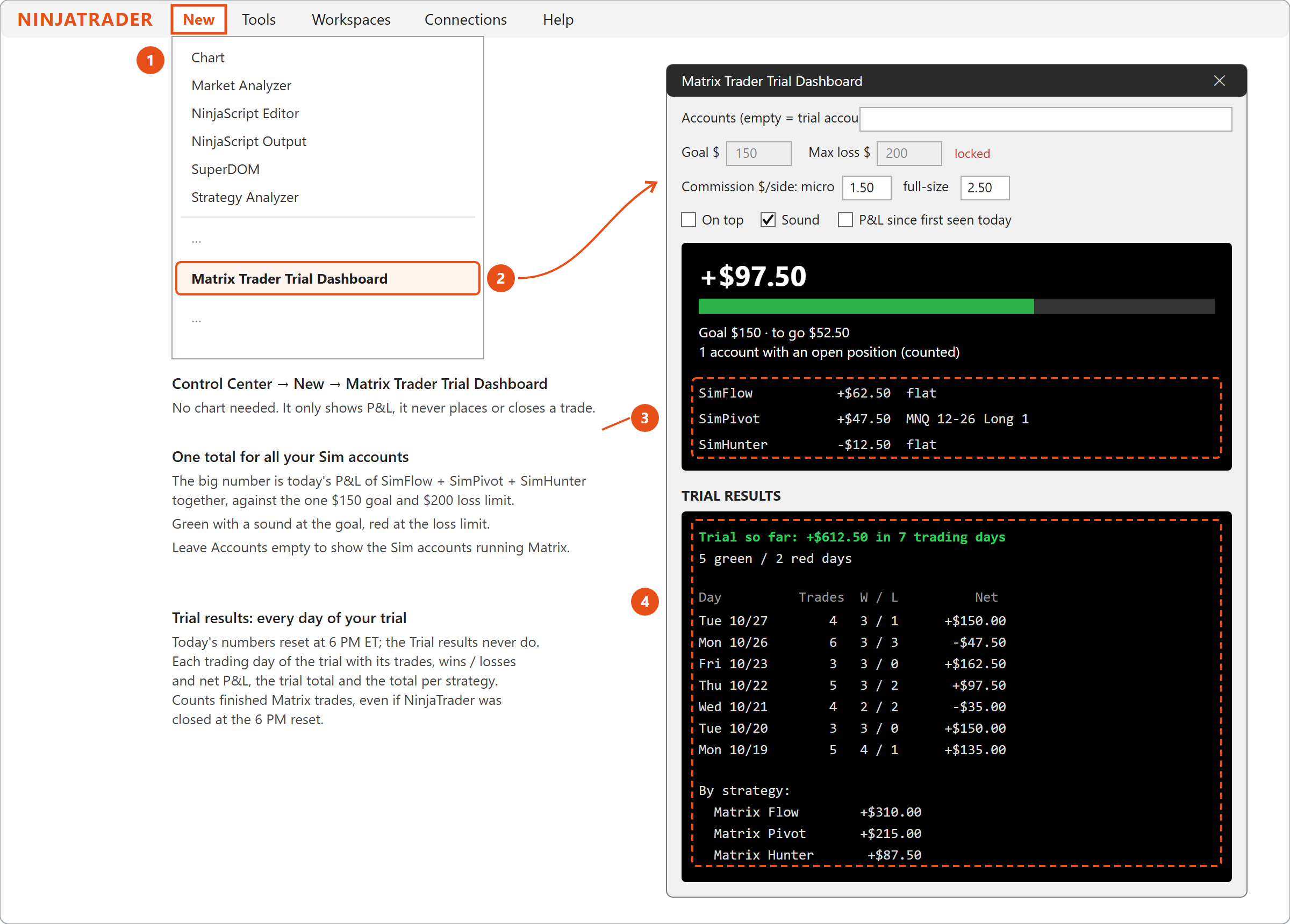
Control Center > New > Matrix Trader Trial Dashboard shows today's P&L of the Sim accounts running Matrix Trader Trial against the goal (your other Sim accounts are not counted). Today's numbers reset at 6 PM ET.
Below that, Trial results keeps every day of your trial: trades, wins / losses and net P&L per day, the trial total, and the total per strategy (Matrix Flow, Matrix Pivot, Matrix Hunter). It never resets, and it counts every finished Matrix trade even if NinjaTrader was closed at 6 PM.
Tip: NinjaTrader's own report. Control Center > New > Account Performance, pick a Sim account (e.g. SimFlow), set the dates from your first trial day to today, and click Generate. It shows every trade, the equity curve and the statistics.
Daily P&L Visibility & Sharing (setting group 4, ticked by default): at the end of each trading day, the day's Sim result (number of trades, wins / losses, net P&L) is sent to Matrix, so your end-of-trial email can show how Matrix did for you. No account numbers or personal data are sent. Untick it to stop sending; the Trial results in the dashboard work either way.
6. Keep the strategies running after 5 PM ET
Turn it off once:
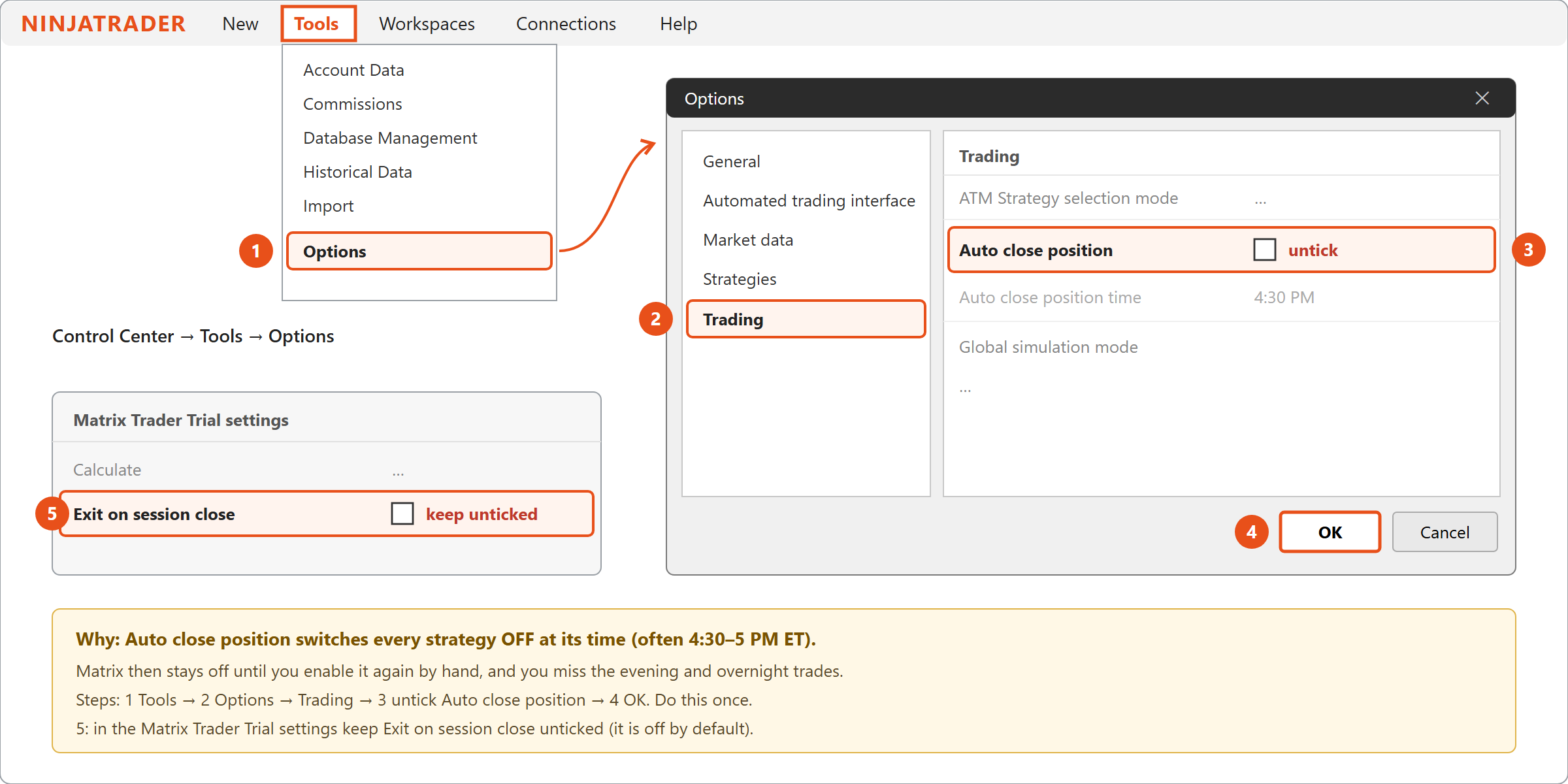
- Control Center > Tools > Options.
- Open the Trading tab.
- Untick Auto close position.
- Click OK.
Also keep Exit on session close unticked in the Matrix Trader Trial settings (it is off by default), so positions are not flattened at the end of each session. You don't need it: Matrix already goes flat by itself at 4:40 PM ET and stays on for the evening session.
Good to know
- NinjaTrader must stay open and connected while you want Matrix to trade.
- After a restart, reconnect, workspace change or Windows update, check the Strategies tab: the Matrix rows must still be Enabled.
- At the contract roll (every 3 months), change the strategy's instrument to the new contract (e.g.
MNQ 03-27).
| ON THE CHART | MEANING |
|---|---|
| TRIAL RUNS ON SIM ACCOUNTS ONLY | You picked a live or prop-firm account. Pick a Sim account. |
| OFF - ANOTHER MATRIX STRATEGY TRADES … | Use a separate Sim account for this strategy. |
| OFF - THE TRIAL RUNS ON 3 SIM ACCOUNTS AT MOST | Use one of your 3 trial Sim accounts. |
| NOT AUTHORIZED - CHECK YOUR TRIAL KEY | Paste the key from your latest trial email. |
| THIS PC ALREADY HAD A FREE TRIAL | One free trial per computer. |
| DAILY BREAK - FLAT UNTIL 6 PM ET | 4:40–6 PM ET: no trades. Trading resumes at 6 PM ET by itself. |
| DAILY GOAL HIT / LOSS LIMIT HIT - DONE FOR TODAY | Trading resumes at 6 PM ET. |
| TRIAL ENDED | Your trial period has ended. Upgrade to Matrix Trader (Full Version). |